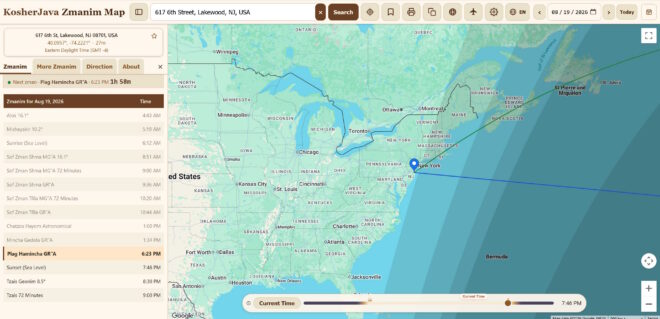
The Zmanim Map was first published on KosherJava in 2007. Since that time it has gone through a number of iterations, improving with each release. The latest release, Zmanim Map 4.0, now has a home at ZmanimMap.com (the old map URLs continue to work).
This release is the most significant improvement to the map since its inception, with hundreds of changes. The map was rewritten from the ground up, and very little of the 3.5 release of November 2012 remains. A great deal of work went into keeping the map simple for someone who wants nothing more than today’s zmanim, while allowing anyone who wants more control to change almost every option. The defaults were chosen so that the settings never have to be opened. The following is a partial list of the new features.
The Map
- The map was rebuilt from scratch, designed for a phone screen first rather than squeezed down from the desktop version. It opens much faster than the old map, and the buttons no longer jump around as the page finishes loading.
- The map can be drawn with Google Maps or with OpenStreetMap tiles, selectable in the settings.
- A new coffee brown, beige and cream theme was added, along with a dark mode that follows the system setting or can be set by hand.
- The map is built as a progressive web app and can be installed on a phone’s home screen or on a desktop like an app. Once it has been loaded, it works with no connection at all, including the zmanim themselves.
- On phones the zmanim open in a sheet that slides up from the bottom of the screen and can be dragged to the height you want, rather than in a small map bubble. On wide screens they can be docked as a panel alongside the map.
- Clicking the marker shows the latitude, longitude, elevation and timezone of the point, and the elevation used for the zmanim calculations. The link button produces a URL for the current location, date and settings that can be bookmarked or emailed.
The Zmanim
- The zmanim are listed in chronological order, with a countdown to the upcoming zman, which is highlighted.
- The zmanim shown in the Zmanim tab are selected by the user. The full list of about 160 zmanim remains available in the More Zmanim tab.
- Sha’os zmaniyos durations are listed for the various opinions.
- Chametz zmanim (sof zman achilas and biur chametz) are shown only on Erev Pesach.
- Polar zmanim were added for extreme latitudes where the sun does not cross the horizon on the given day, including the sunrise, sunset and plag hamincha of the Ben Ish Chai, and the start of the day and plag hamincha of the Teshuvos Vehanhagos.
- Zmanim that have already passed are dimmed.
- The following information is displayed above the zmanim as applicable. The day of the week, its Hebrew date, the parshah, Yom Tov, Rosh Chodesh, Chanukah and the day of the omer. In the zone where the authorities disagree about the date, the panel says so.
- On a fast day the panel gives the start and end of the fast.
- A solar elevation strip can be shown above the zmanim, off by default and a single setting away. It shows how far the sun is above or below the horizon at the selected location and time, with a gauge of the twilight bands that can be expanded. On a polar day it names the condition (midnight sun or polar night). For anyone well versed in zmanim, the elevation in degrees is often the quickest answer to what the sun is actually doing. At high latitudes it also explains why a zman may not occur at all, because the sun never reaches the depth below the horizon that the zman requires. A flight from Los Angeles to Tel Aviv is a good example: the great circle route runs far enough north that the sun may never drop to the depth of tzais hakochavim, leaving it unclear whether sefiras haomer can be counted that night.
- The calculation algorithm is selectable. Meeus and SPA were added to the NOAA and USNO algorithms that the map already offered (both as part of the KosherJava 3.0 release). The three modern algorithms agree to within seconds of each other.
- NOAA – the default. It has been part of the KosherJava library for many years, and is based on NOAA’s implementation of Jean Meeus’s low-accuracy algorithm.
- Meeus – Jean Meeus’s high-accuracy algorithm. While its underlying solar-position accuracy is roughly an order of magnitude better than NOAA’s low-accuracy method, this translates to only a few seconds of improvement for typical sunrise and sunset calculations, and generally much less significance for practical zmanim.
- SPA – the Solar Position Algorithm developed by the National Laboratory of the Rockies (formerly the National Renewable Energy Laboratory, NREL). It is another high-accuracy algorithm based on Meeus, with a published uncertainty of about 1 arc-second. In practice its results for sunrise and sunset are under 1 second from an exact ephemeris, essentially the same level as Meeus for zmanim.
- USNO – based on the old U.S. Naval Observatory Astronomical Almanac algorithm. It is substantially less accurate than the other three and is no longer considered state of the art. It is retained for reference and for comparison with older implementations.
The Time Slider and Twilight Bands
The day and night shadow is no longer a fixed set of bands. The user selects which twilight bands are drawn, from the sunrise and sunset edge through the commonly used tzais, misheyakir and alos degrees, with each band drawn at exactly its angle. Enabling only the ones that you follow will show that opinion on the map and nothing else.
A time slider sits below the map. Dragging it moves the shadow across the earth for the selected date and location, so you can watch where the sun actually is at alos or tzais, instead of taking the number on trust. The track of the slider is painted with the day itself: night at the ends, daylight in the middle, twilight blended between them. Sunrise and sunset are marked on the track, along with a marker showing where the current time falls.
Finding a Location
- The map can find your location automatically at load (once permission has been given), and a locate control on the map will find it again at any time.
- The search box completes addresses as you type, with a plain search as a fallback.
- Airport codes are recognized in the search box. Typing a 3-letter IATA or 4-letter ICAO code from the included database of over 4,000 airports with scheduled service will drop the pin at that airport.
- The name of the selected location is looked up and shown on the map, together with its coordinates, elevation and timezone. Ocean points and other unnamed places just show the coordinates.
- Locations can be saved and returned to from a list.
- The browser’s Back and Forward buttons step through the locations the pin has visited, and each stop’s URL is a link that can be bookmarked or emailed. Links carry the location, zoom, map type, date, timezone, algorithm and the display options.
- The date selector has previous and next day arrows and a Today button that also sets the map to move to the next day at midnight again.
Direction to Yerushalayim
The direction tab now has a compass. It normally points the way on its own, and on phones that support it the needle can track the direction you are facing, so you can turn until it points straight ahead. A toggle switches between the great circle and rhumb line bearings. The needle, pointer and readout are colored to match the lines on the map.
Calendars and Downloads
- Weekly and monthly zmanim calendars can now be printed. They are generated in the browser, so they work offline, using the zmanim selected for the Zmanim tab. They include the Hebrew date, Yom Tov names, the parshah, Rosh Chodesh, the omer and candle lighting on Erev Shabbos and Yom Tov, including after nightfall where that applies, and print in the language of the page on either Letter or A4. A preview opens with navigation between weeks or months before printing or saving as a PDF.
- The annual Excel calendar is still available, and is now offered explicitly in both its standard and full zmanim forms.
A Multilingual Map
For the first time the map is available in languages other than English. It is fully translated into English, Hebrew, French, Spanish, Russian and Ukrainian, including the About text and the explanations, with a right-to-left layout for Hebrew. Additional languages may be added in the future.
The language you choose changes the words. Your browser’s region decides the date and number formats, and whether distances are in miles or kilometers. An English-speaking user in London sees metric units; one in New Jersey does not. The Google Maps labels and the looked up place names follow the selected language as well.
Settings
The old map had no settings, and what you saw was what everyone saw. Version 4.0 has a settings screen, and almost everything on it is a choice that the map could not previously offer. Each setting has an information icon explaining what it does.
- The zmanim that appear in the Zmanim tab, and whether times are shown to the second or rounded to the minute.
- Light, dark or the system theme, and imperial or metric units.
- The language.
- Reset to default is a category picker rather than an all or nothing button, so the settings can be cleared without losing the saved locations, or the reverse.
Which lines and shading appear on the map is chosen here as well, along with the base map and how the zmanim are shown on a wide screen.
The settings are remembered on the device, and travel in the link, so that a link that is shared opens the way it was set up.
Backup, Restore and Sharing
- Backup and Restore exports the saved locations and settings to a single file, and imports them back. Importing adds what is missing, so importing the same backup twice does nothing.
- Sharing uses the phone’s share sheet where it is available, and links that are shared show a preview naming the location.
- Printing produces a proper sheet with the location, the timezone and a map of the point.
Accessibility
The map can be used with a keyboard as well as with a mouse or touch, works with screen readers, and can be navigated with a keypad on feature phones. The buttons and controls were sized to be tapped reliably on a small screen.
Flight Mode
A flight mode that calculates zmanim along an airline route is in advanced beta testing, and is not yet open to the public. A separate article will cover it. Anyone interested in testing it is welcome to contact me.
Still in the Map
The map still does everything that it did before. The rhumb line and great circle bearings to Har Habayis, the halachic date lines with their graira areas, the date selection and the elevation lookup were all rebuilt on the new code, and can now be drawn on either base map.
The KosherJava Zmanim library that the map is built on remains open source under the LGPL 2.1. The map itself is not.
Your feedback is important. Please be in touch with any suggestions, issues or clarifications.